What it doesできること
It keeps camera and production media on the operator's machine or chosen storage while hosted MOTK tools send authenticated, project-scoped commands.カメラと制作メディアは作業PCまたは選択した保存先に置いたまま、ホスト版MOTKから認証済み・プロジェクト限定の指示を受け取ります。
Toolsツール一覧 / MOTK Companion
A local companion app that connects MOTK to cameras, folders, encoding, upload, playback, and Kdenlive.MOTKをカメラ、フォルダ、エンコード、アップロード、再生、Kdenliveへ接続するローカル・コンパニオンアプリです。
It keeps camera and production media on the operator's machine or chosen storage while hosted MOTK tools send authenticated, project-scoped commands.カメラと制作メディアは作業PCまたは選択した保存先に置いたまま、ホスト版MOTKから認証済み・プロジェクト限定の指示を受け取ります。
Stop-motion and small production teams that need unattended local automation without sending camera media through a cloud relay.カメラ素材をクラウド中継せず、ローカルで自動処理を行いたいストップモーションおよび小規模制作チーム向けです。
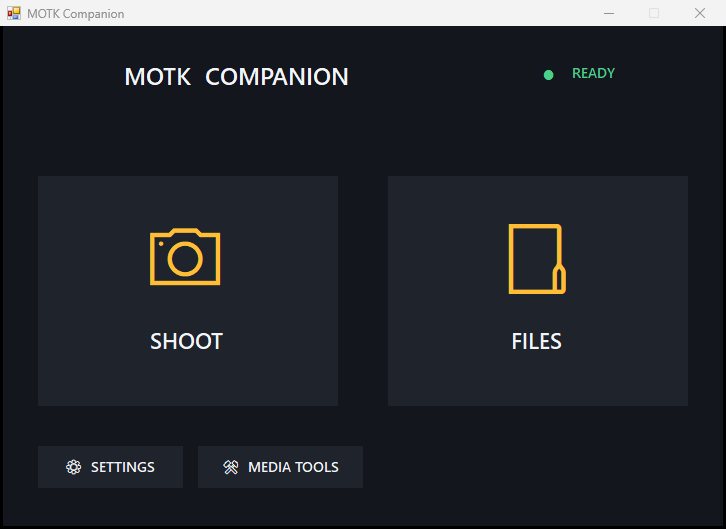
Public beta 0.4.0-beta.9 folds ISO Auto into the ISO list, keeps live view running when the camera rejects a setting, starts with the camera off or unplugged (probed on demand) and adds one-click browser launch (the installer registers motk-companion:// so Shoot and this site can start the Control Center directly) and verified SIGMA fp native still capture (settings, live view, and RAW-safe originals) on top of the visual Control Center introduced in beta.4, which replaces loose files and separate shortcuts with one visual Control Center. SHOOT starts and pairs MOTK Shoot automatically; FILES opens the exact local production folder. Storage, camera, SDK, manual pairing, and Media Tools stay behind Settings. Running updates safely stop the Control Center and its services, preserve local data, swap the app transactionally, and restart.公開ベータ0.4.0-beta.9は、ISOのAutoを選択肢に統合し、カメラが設定を拒否してもライブビューを維持し、カメラ未接続・電源OFFでも起動して待機できるようになり(接続時に自動検出)、ブラウザからのワンクリック起動(インストーラーがmotk-companion://スキームを登録し、Shootやこのサイトから直接Control Centerを起動)に対応し、SIGMA fpのネイティブ静止画撮影(設定・ライブビュー・原板保護)を実機検証済みにしました。beta.4で導入したControl Centerは、散在していたファイルとショートカットを1つのControl Centerへ統合しました。SHOOTはMOTK Shootを自動接続し、FILESは実際のローカル制作フォルダを開きます。保存先、カメラ、SDK、手動PAIR、Media ToolsはSettingsの中です。起動中の更新でもローカルデータを保持し、安全にアプリを交換します。
GPL-3.0-or-later license · No account is required for an available site download.公開済みダウンロードにアカウントは不要です。
SHA-256: 060ed41b18541f8836f0e87586bfb32412a029f7b491186f755f7a9bd3898ef3